 Marcin Petrów
It’s started as usual. We talked. New tool arrived (cmux) and discussion has started. Initially we both were excited. It’s like two kid in a sandbox when someone brings new bucket, with perfect handle, nice color and since begining we had eyes widely opened.
I’m not saing that cmux is bad! at all!
My friend bring me new tool
Saing that he is impressed. His attitute was so good that I was almost also impressed without seeing it. I promissed that I will take a look next morning on that and tat was the end of my day.
I took a look.
Me: Hmm… what’s different?
Him: What? Why different? It’s briliant!
Me Ok, but what new I get here? What will be new for me here?
… and after a while I knew. He didn’t had a chance to work with tmux as much as I.
This is for him, and for you maybe
tmux is a nice virtual thing for your terminal and helps you avoid madness of multiple windows. It bring you a bit of asciiart UI into your terminal and let you controll it via keyboard.
This will not be a full tutorial about tmux, becaus ethere are already many tutorials that will be better place to start with.
You go here if you like: https://tmux.app/
What I will shou you is what I mostly use when I’m using it.
Why tmux?
Because it’s fully text UI.
Because I can do everything from keyboard.
Because I can cusomize it as much as I need whenever I need.
It holds my terminals mess in one place. Letting me display it as I need.
Shortcuts
My standard activator i CTRL+B. For me this do two things. Works as an activator and if I double it - switch to previous pane.
What is an activator? This is a keyboard combination that tels tmux that you want to do something with it. Avoid here shortcuts from other apps to not get crazy when some one else will be reacting on your shot.
Than arrows! After activator I can use arrows to select different pane.
What pane is?
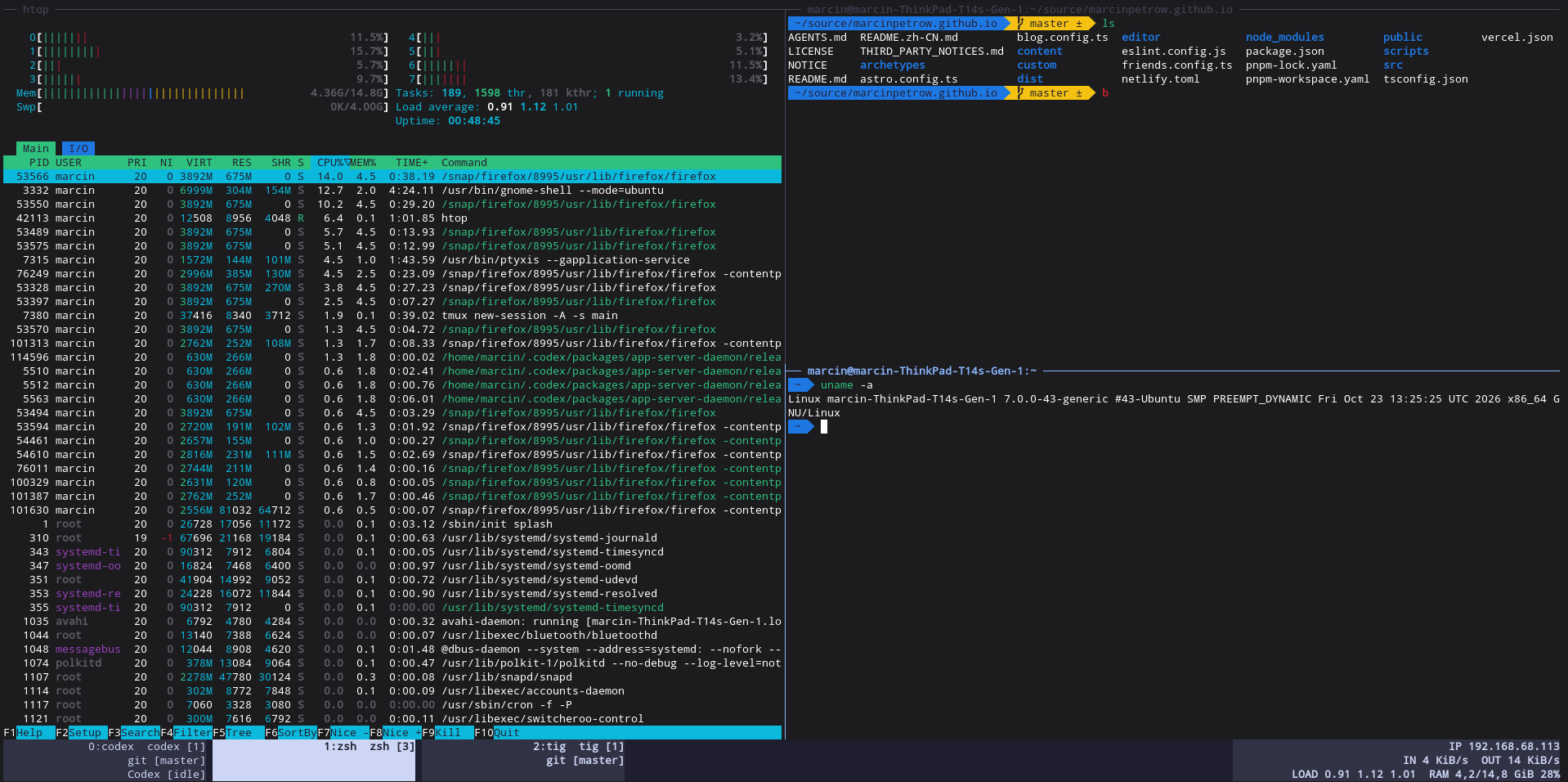
you can see here 3 panes that you can switch. I got binding set to activator+H for horizontal and activator+V for vertical split.
Here I also commonly use activator-C for create new window activator+N or P to select next/prev window.
Status line

Fisr I extended status line to 3 lines. I know that you can tell that I waste space… but be honest. 20years ago 80x25 was something usually seen. Today? really? On a wide screen?
Nevermind, I got 3 because I can.
From left side you can see windows list. First line of each window gives his [ID], then name, after that [amount of panes in that window].
Second line ususally got information about git. If this directectory got git at all. I believe that we all know what [master] is.
This line is something new to me - after all those years with tmux.
It’s information that I use codex i this pane and status of his work. We will get back to it.
Right side contains my local IP, internet speed and system parameters. nothing special.
So now I can also add that actvator+1 will switch to window with ID 1. Boom!
It’s not about the tool
Let’s get back to codex. This is about solving issue. Like choocsing ducktape instead hyper-powerful-brand-new glue. Or zip ties where you need to hand;e few wires together. Today this is more valid than ever - your tool needs to bran new. Newwest technology always.
I’m kidding. Tmux for me is synonim of my experaince. Knowledge which elp me moving forwar. It just fits even in combination with newest things like AI agents.
How you handle multiple sessions these days? Some fancy stuff maybe?
Many of our tools from the past are still very good. Like this screewdriver from description. They will be good in next 10, 20 years I guess.
You don’t need to buy new stuf only because it’s new. It’s good to follow and choose wisely.
As I said - cmux is also great!